Schedule a demo and free trial Contact us
  • Login
    • Login
    • US & Canada login
Utilmate
  • Solutions for
    • Embedded Networks
    • Utility Billing
    • AER Authorised & Exempt Retailers
    • Body Corporates
    • Property Managers
    • Multifamily Communities & Home Owners Associations
    • Data and IoT
  • Our Plans
    • Our Plans
    • Starter Plan
    • Pro Plan
    • Premium Plan
  • Pricing
  • Partners
    • Software Partners
    • Connect with Xero
    • Connect with Buildium
  • Company
    • About Utilmate
  • Resources
    • Webinars
    • Updates
    • Utilmate Headlines
Utilmate
  • Solutions for
    • Embedded Networks
    • Utility Billing
    • AER Authorised & Exempt Retailers
    • Body Corporates
    • Property Managers
    • Multifamily Communities & Home Owners Associations
    • Data and IoT
  • Our Plans
    • Our Plans
    • Starter Plan
    • Pro Plan
    • Premium Plan
  • Pricing
  • Partners
    • Software Partners
    • Connect with Xero
    • Connect with Buildium
  • Company
    • About Utilmate
  • Resources
    • Webinars
    • Updates
    • Utilmate Headlines

Select the search type
  • Site
  • Web
Search
Resources / Updates

Updates

Utilmate / Monday, November 16, 2026
/ Categories: Updates

Need support? Submit your request directly online

The recent Microsoft email outage highlighted how email disruptions can affect communication, including requests for support.

To help ensure your request reaches our support system, please log tickets through at utilmate.zendesk.com.


Why submit your request online?

  • Avoid email delivery issues: Submit your request directly into our support system without relying on your email service to send it.
  • Help us investigate sooner: Include a clear description, screenshots, error messages and relevant account numbers to help us investigate.
  • Keep everything together: Your request, attachments and subsequent updates stay linked to one ticket.
  • Track your requests: Sign in to the Knowledge Base to view your tickets, check their status and follow progress.
  • Add updates easily: Check an existing ticket and provide further information without creating duplicates -  helping our team keep the full picture in one place.
  • Maintain a support history: Refer back to previous requests and solutions.
  • Prioritising by business impact: Tickets are prioritised according to their impact on your business, helping our team escalate issues that disrupt critical operations.


How to log a ticket

From your browser: Visit utilmate.zendesk.com and select Submit a Request.

From Utilmate CRM: Click the ? icon, then select Submit a Request.
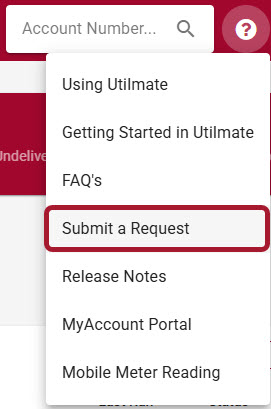
Submit a request support ticket


If email is disrupted, you may not receive confirmation or notification emails promptly. Sign in to the Knowledge Base to check your request and view updates directly.

Thank you for helping us keep your support requests organised and moving forward.

Previous Article Planning Ahead: Christmas 2026 holiday dates
Print
24 Rate this article:
No rating

Utilmate

Cloud software for utility pricing, meter data, billing and customer account management.

Solutions

Embedded networks
Utility billing
Authorised and Except Retailers
Billing agents
Property managers

Explore

Plans
Pricing
Partners
Webinars
Updates

Contact

NZ: 0800 947 901
Australia: 1800 952 579
US: 877 978 1677
enquiries@utilmate.com
Contact us
Terms Of Use | Privacy Statement | Copyright 2026 by Utilmate